
Pick the tool by the job. A deck generator makes a first draft from a prompt. An in-deck assistant works on the deck already open in front of you. A chart tool draws charts that stay editable. A rewriting tool fixes the text you have selected. Most "best AI for Google Slides" lists mix these four and then rank them against each other, which is why the rankings feel arbitrary.
This guide sorts the tools by job, says where each one is strongest and names the cases where it is the wrong pick. We build ChartKit, so we have a stake. The ChartKit sections are the longest, and we will say plainly where a competitor is the better choice.
The four jobs
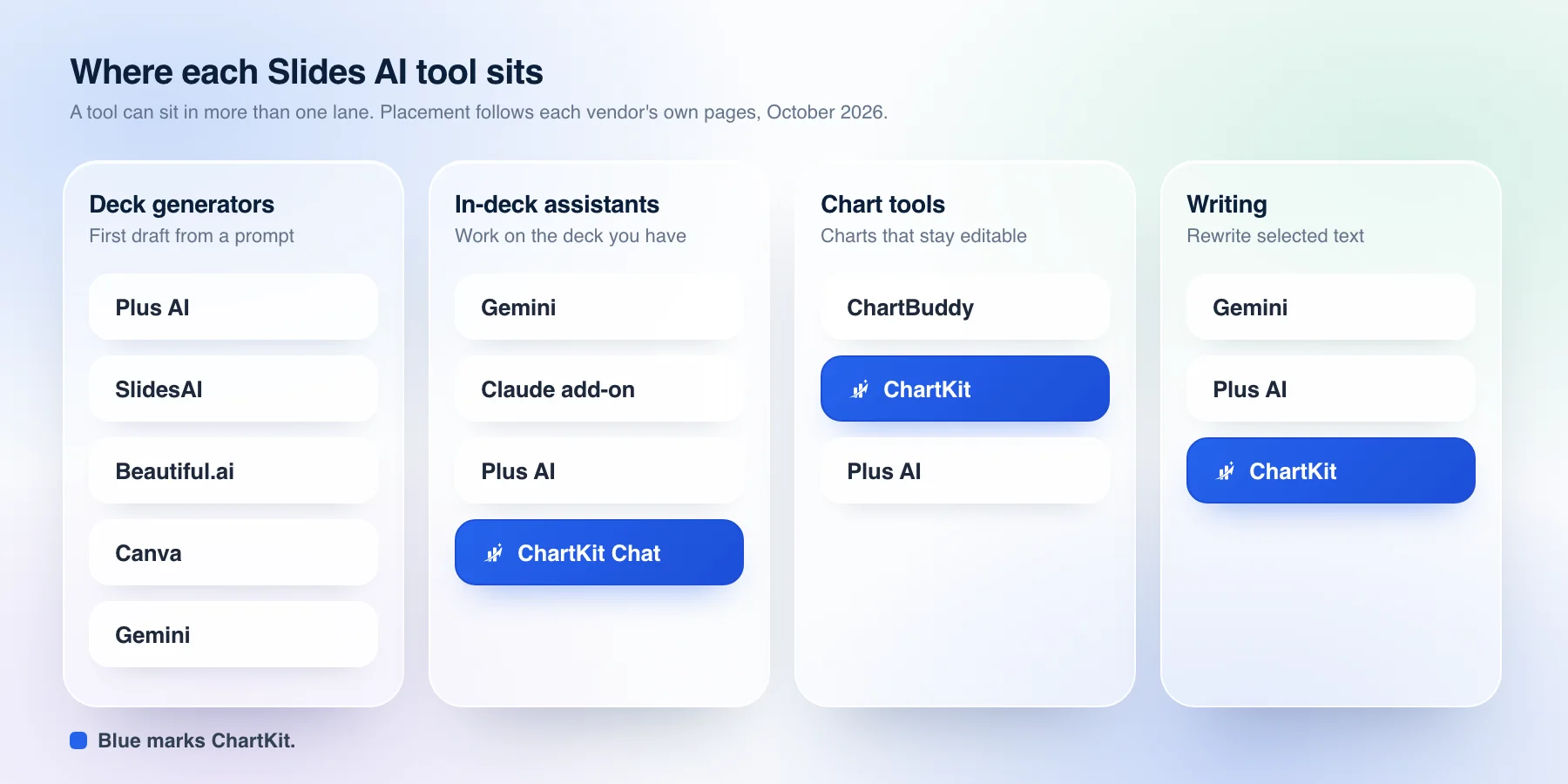
Deck generators turn a prompt, a document or a transcript into a set of slides. They save the most time on a blank page and the least on a deck that already exists.
In-deck assistants act on the open deck. They edit text, restructure a slide, add a slide that matches the theme or insert a chart where you point. They need to read what is already there, so they live inside Slides.
Chart tools draw charts that are real objects you can reopen and change. This is the job a chat model does worst on its own, because the usual output is a flat image.
Writing tools rewrite the text you select. They are small, they are used constantly and they are easy to underrate.
Comparison
| Tool | Best for | Edits your deck | Own AI plan | Price |
|---|---|---|---|---|
| Plus AI | First drafts | Yes | No, credits | From $10/user/mo, billed yearly |
| SlidesAI | Text to slides | Yes | No, credits | Free plan, paid tiers |
| Gemini in Slides | No extra install | Yes | No | In eligible Workspace plans |
| Claude for Workspace | Claude beside the file | Yes | Yes, paid Claude | Paid Claude plans, beta |
| Beautiful.ai | Standalone decks | No | No | 14-day trial |
| Canva | Design-first decks | No | No | Not checked |
| ChartBuddy | Consulting charts | Yes | Not stated | Free 10 sessions, Pro €10/seat/mo |
| ChartKit | In-deck agent and charts | Yes | Yes, Claude or ChatGPT | Free 10 charts/mo, Pro €10/mo |
Sources are each vendor's own pricing or help page, checked in October 2026. Plus AI also lists $15 billed monthly and a 7-day trial. SlidesAI's page showed conflicting figures, so we have not quoted one. Claude for Google Workspace is in public beta per Anthropic's 6 October 2026 announcement. ChartKit Pro is also €80 a year and includes Chat.
Prices move, so treat the table as a snapshot from October 2026 and confirm on each vendor's page before you buy.
Deck generators
Plus AI is the one most lists put first, and for the job it does that is fair. Its site describes a native add-on that builds a deck from a short description or from an uploaded PDF, Word or PowerPoint file, then lets you rewrite and reformat slides afterward. Its site says charts and tables are editable in Google Slides and PowerPoint, and that the Teams plan accepts custom templates with your logo, fonts and colors. If your problem is "I have a document and need 12 slides by tonight", start here. ChartBuddy's own comparison of these tools also calls Plus AI the easiest way to add AI without changing how you work.
SlidesAI covers similar ground at a lower entry point. Its site describes building and editing slides inside Google Slides from a topic, notes or a document, with tone and language settings and a Brand Kit. The plan cards on the page and the page's own structured data disagreed on the numbers when we checked, so we have not quoted a price. Check the live page.
Beautiful.ai is a standalone presentation app with its own layout engine. Its site mentions PowerPoint and PDF import and export and does not mention Google Slides, so it suits teams that have left Slides behind more than teams that live in it.
Canva is a design platform first. Its Google Slides story is an export step, not an in-deck integration. We could not load Canva's own pages when we checked, so we are saying less about it than the others. ChartBuddy's comparison describes the same pattern, strong templates and weaker integration with Slides.
A generator shares one limit. The draft is the easy part. The next three hours go on editing numbers, fixing charts and matching the house style, and that is work on a deck that already exists.
Gemini in Google Slides
Gemini is built in, which is its main argument. Google's help pages say it can create new slides in your current theme, generate images, summarize a presentation, write or rewrite slide content and pull in Drive files with @. It needs an eligible Google Workspace or Google AI plan, and Google notes that Gemini writes text into a text box only if the slide already has content.
Use it when you want AI with no install and no new vendor review. The gaps for a finance or consulting deck are charts and house style. Google's help does not list chart creation, and a chat model's generic output rarely looks like your firm's slides. ChartBuddy's comparison also says Gemini's generated slides can be hard to edit and keep consistent across a deck. That is their claim and we have not tested it.
Claude for Google Workspace
On 6 October 2026 Anthropic announced Claude for Google Workspace, now in public beta on all paid Claude plans. In Slides it opens in a sidebar next to your deck, builds new slides from the deck's own layouts and themes, and flags elements that overlap or run off the slide. It asks for approval on each edit by default, with an accept-all mode available. Separate Google Docs, Sheets and Slides connectors let you start from the Claude chat and create or edit files from there.
This is the closest first-party competitor to what we build, and it is worth trying if you already pay for Claude. Its announcement describes chart features in Sheets and does not describe charts in Slides, and it says nothing about your own saved components. If your decks are mostly text, it may be all you need. If they are full of charts, read the next section.
ChartKit Chat, the in-deck agent
ChartKit is a Chrome extension for Google Slides, Docs and Sheets. ChartKit Chat is a chat docked inside Slides that acts on the deck in front of you. It is the AI part of the product, and it is built around one choice. The model is yours.
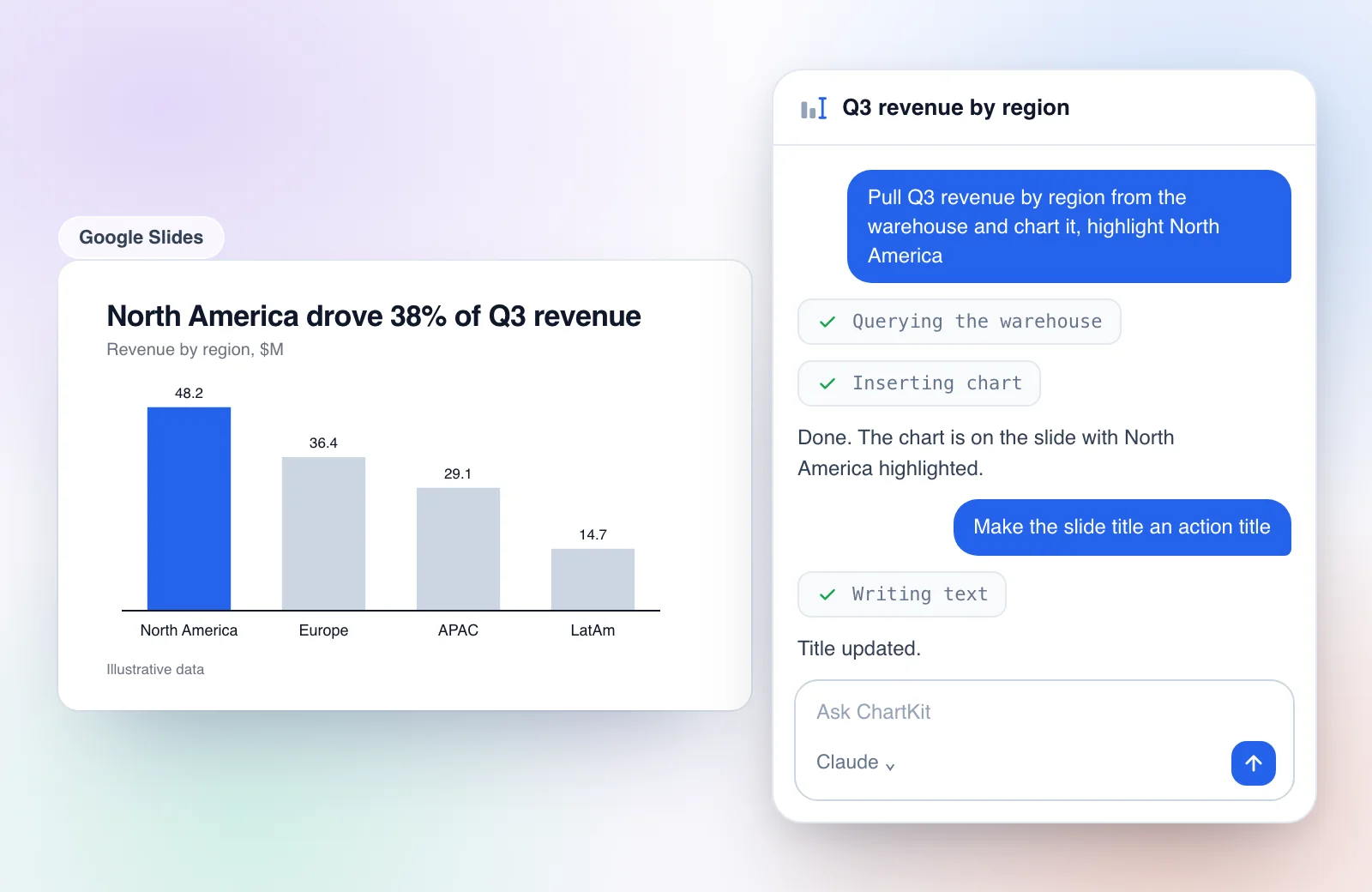
A mock of the docked chat. The prompts and the numbers are illustrative.
What it can do on a slide
Chat reads the slide first, then works on it. We have verified these actions in the product.
- Edit text. It writes into the text boxes on the slide, replacing or appending, and rewrites copy you point it at.
- Insert a chart. It adds an editable ChartKit chart to the current slide. Ask for a change to a chart already there and it swaps the chart in place and keeps the frame.
- Build or replace a slide. When you ask for a slide, or to turn a rough wireframe into one, it builds the slide or rebuilds the current one.
- Place your saved components and layouts. If you name a component or a layout from your library, it inserts that one, fitted into the frame where you want it.
- Use your own MCP connectors. In chat mode the Claude session keeps the MCP servers you have set up, so a data warehouse connector can supply the numbers before the chart is drawn.
Before it edits a deck for the first time, it asks for permission with an inline card. It does not open a sign-in window on its own.
The first animation below is the real product doing the simplest version of this. A table of regional revenue sits on a slide, the prompt is "Chart revenue by region", the chat reports "Bar chart added" and North America is highlighted on the slide.
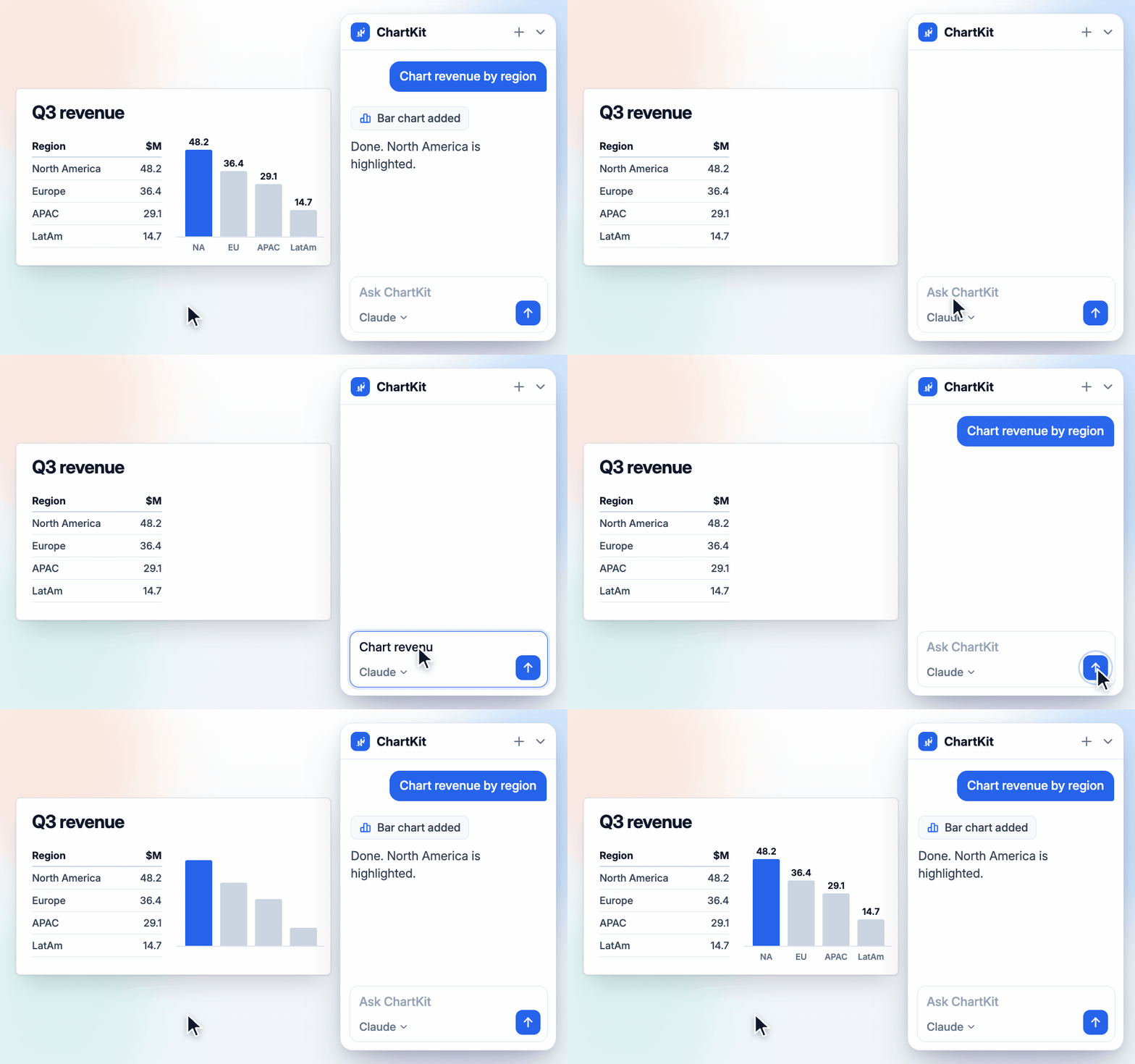
Real product capture. Illustrative data.
Your own subscription, no ChartKit markup
Chat does not call a ChartKit model. There isn't one in this path. ChartKit Desktop runs a small relay on your machine that starts the Claude Code or Codex command line tool you are already signed in to, so the usage counts against your Claude or ChatGPT plan. ChartKit does not resell or mark up model usage, and it holds no API key for you.
Two consequences follow. Your prompts and the slide content go to Claude or ChatGPT under your own account, the same as using those apps directly. And the model you get is the model you pay for, with the limits of your plan. ChartKit Desktop shows when you have hit a usage limit and when it resets.
Teams that want one managed model have a second route. An admin can point Chat at the team's own model endpoint, such as a company gateway, and members then need no desktop app. The company pays its gateway and ChartKit never holds a model bill.
Chat is a ChartKit Pro feature, and Pro comes with a free trial. ChartKit's free plan covers 10 charts a month. Pro is EUR 10 per month or EUR 80 per year, as listed on the pricing page.
Rewriting selected text
The writing pill is the small half of the same system. Select text in Slides or Docs and a spark button appears. It offers Improve, Shorten and Action title, plus Write when nothing is selected. The result card can be re-run as Shorter, Longer, Formal or Casual, shows a word-level view of what changed, and offers Replace or Insert below. It runs on the model you chose in the chat, which is the same Claude or ChatGPT subscription.
Saved components, placed by prompt
If you have saved a block of shapes as a component, such as a row of KPI cards, Chat can place it by name. The capture below shows the library step on its own. It saves three KPI cards as a component on one slide and places them on a "Q4 review" slide from the component panel.
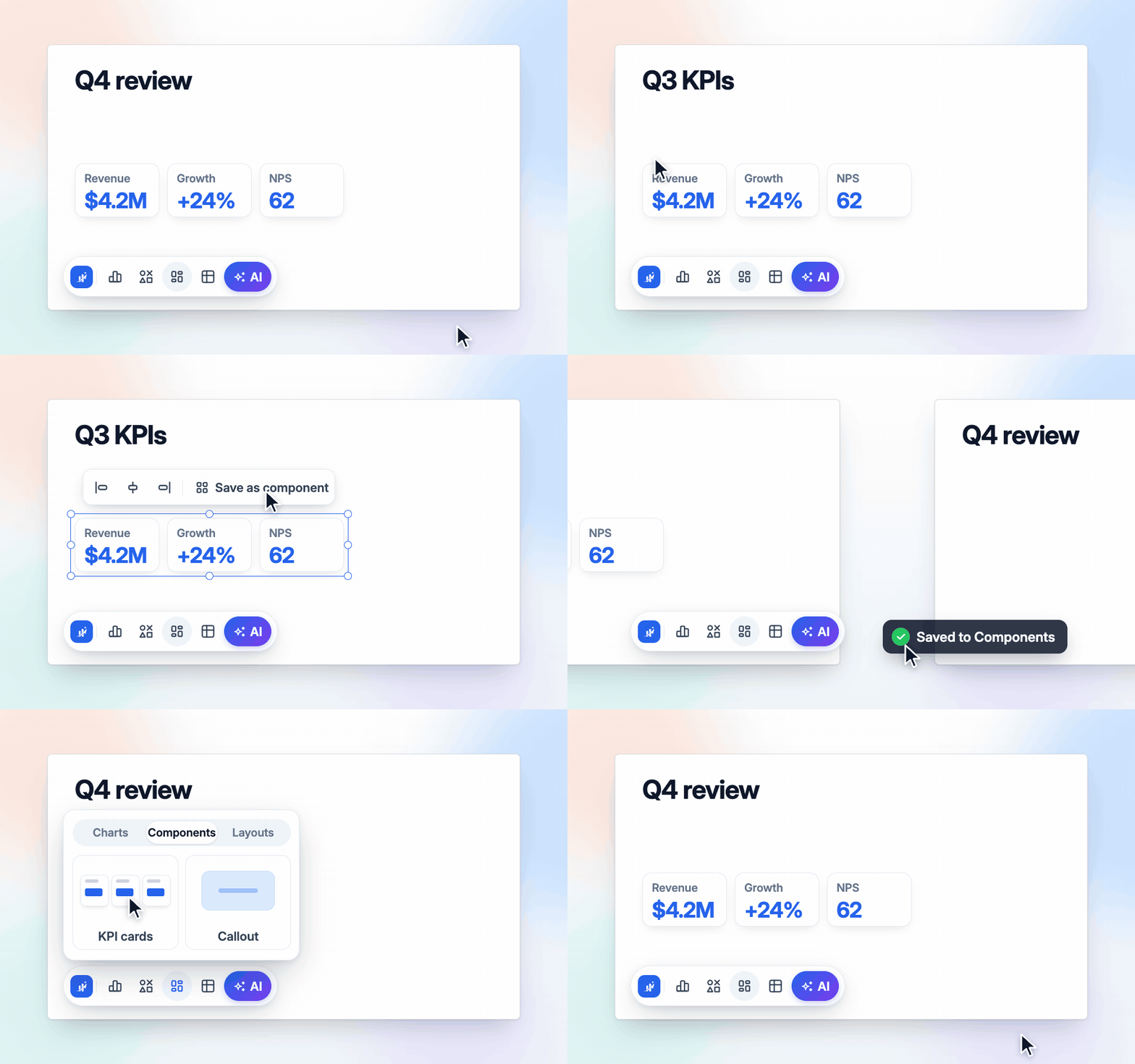
Real product capture. The component panel by hand. In chat you ask for the component by name.
Where it is the wrong pick
ChartKit Chat is not a document-to-deck generator. If you need 30 slides from a report, use Plus AI, SlidesAI or Gemini for the draft and bring the deck into Slides, then use Chat on it. It also needs ChartKit Desktop running with a Claude or ChatGPT command line sign-in, or a team endpoint. If you cannot install an app or do not have a Claude or ChatGPT plan, the chat will not connect.
The connector for claude.ai
Not everyone wants a chat inside Slides. If you live in Claude, the ChartKit connector at getchartkit.app/mcp lets you ask Claude for a chart and put it on a slide from there. The model returns the chart in the conversation with Insert into Slides and Edit buttons under it. Insert sends it to the Slides deck you have open in Chrome, and the chart keeps the same editable model as one drawn in the extension.
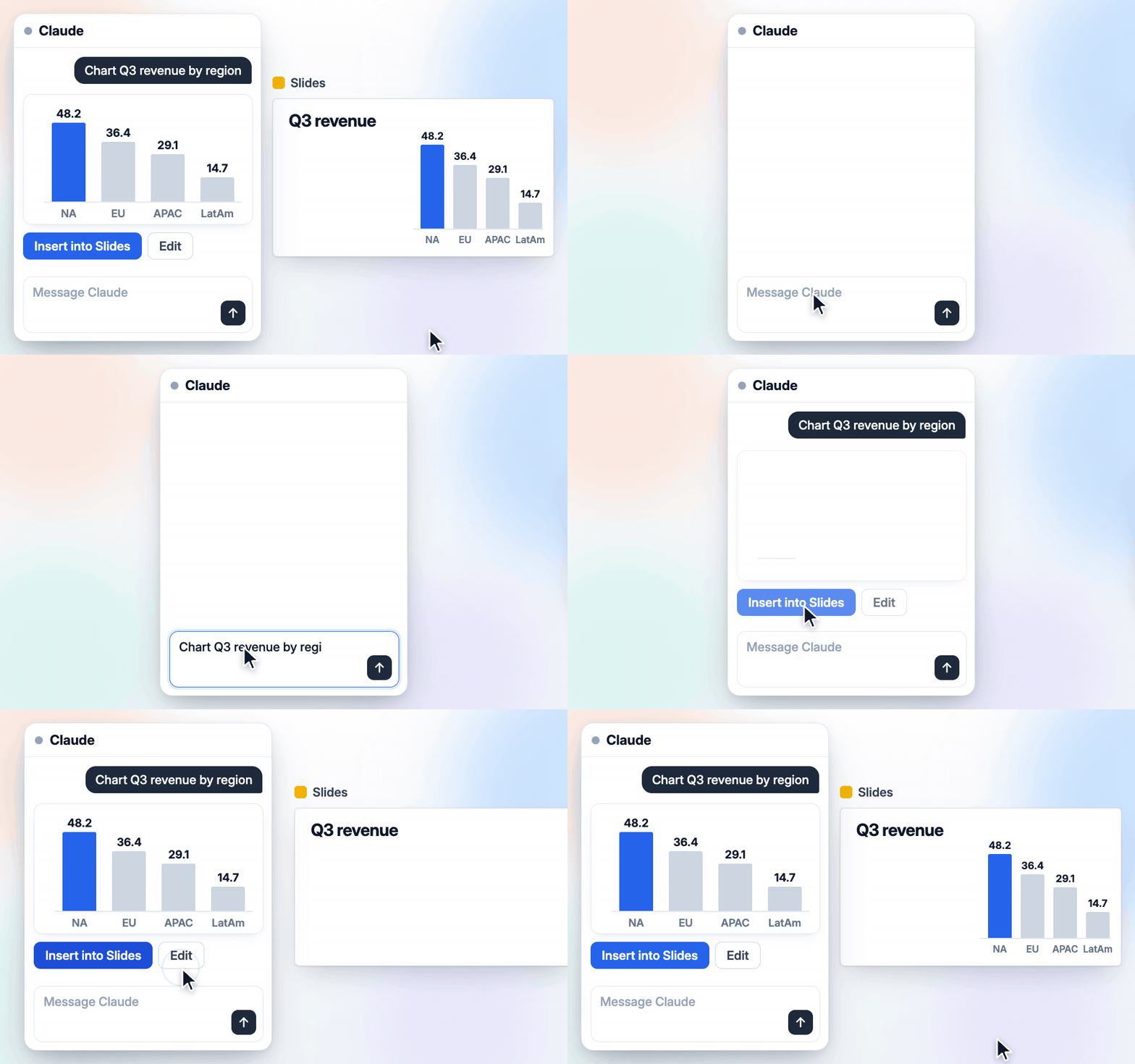
Real product capture. Illustrative data.
This is the right route when the thinking happens in a Claude conversation and the chart is the output. The guide to making charts in Claude and ChatGPT for Google Slides covers the setup and what a plain Claude chart looks like next to a ChartKit one.
Chart tools
ChartBuddy is the established chart add-on for Slides. Its pricing page lists a free plan with 10 sessions and Pro at EUR 10 per seat per month, and it says its Hub can generate charts with AI. Its own comparison lists waterfall, Mekko, bar, line and scatter charts and recommends it for charts. We compare the two in detail in ChartKit vs ChartBuddy, and the wider add-on roundup places both next to the native options.
ChartKit's position is that the chart tool and the AI should be the same product. A chart Chat inserts is a real ChartKit chart. It has the same waterfall, Mekko and stacked bar types, the same annotations and your palette as a chart you built by hand. So the prompt and the manual edit work on one object. If you build think-cell-style charts, the think-cell alternative guide goes through that side, and the add-ons for consultants and finance covers the rest of a finance stack.
Which one to pick
- A first draft from a document, tonight. Plus AI, SlidesAI or Gemini.
- No new software, light edits, summaries. Gemini in Slides.
- Claude is already how you work, and your decks are mostly text. Claude for Google Workspace.
- Charts are the point and the deck must look like a consulting deck. ChartKit or ChartBuddy.
- You want to say "chart this" or "use my KPI cards here" inside the deck, on your own model. ChartKit Chat.
- The thinking happens in Claude. The ChartKit connector for claude.ai.
Two of these combine well. A generator for the skeleton, then Chat for the charts, the rewrites and the slide-level fixes. The tool that wrote the draft rarely needs to be the one that finishes it.
Common questions
What is the best AI tool for Google Slides? It depends on the job. Plus AI, SlidesAI or Gemini for a first draft. Gemini, the Claude add-on or ChartKit Chat for work on a deck you already have. ChartBuddy or ChartKit for charts that stay editable.
Does Google Slides have built-in AI? Yes. Gemini in Slides creates slides in your theme, generates images, summarizes and rewrites, on an eligible Workspace or Google AI plan.
Can Claude edit Google Slides? Yes. Anthropic's Claude for Google Workspace add-on opens beside your deck, and its Slides connector works from the Claude chat, both in beta. ChartKit Chat is a third route that inserts editable charts.
Can AI make editable charts in Google Slides? Some tools can. ChartKit Chat and the ChartKit connector for claude.ai place a ChartKit chart you can open and edit afterward. A chat model on its own usually returns an image.
Do I pay extra for the AI in ChartKit? No model fees go through ChartKit. Chat runs on your own Claude or ChatGPT subscription, or on your team's endpoint, and is part of Pro with a free trial.
Does ChartKit Chat send my deck to ChartKit's AI? There is no ChartKit model in this path. Prompts and slide content go to Claude or ChatGPT under your own account.
If your decks are full of charts and you already pay for Claude, try ChartKit for free and start the Pro trial to put the chat next to your next deck.